Can I add bulleted and numbered lists to LandingRabbit pages?
Yes, you can.
In any section that includes a text block, such as a paragraph or subtitle, you can add both bulleted and numbered lists.
Add bulleted and numbered lists to any text paragraph
Select any text paragraph or subtitle and the editing options appear. 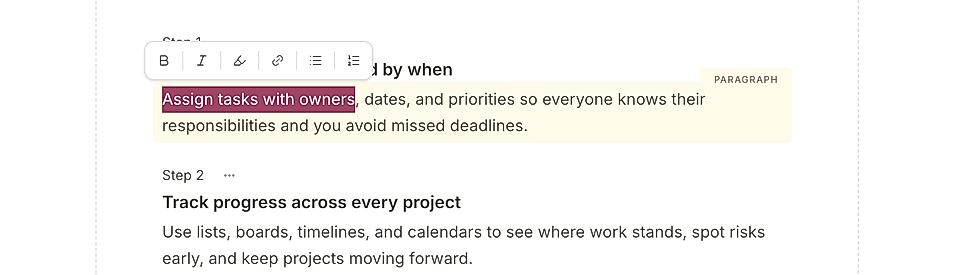
When using a bulleted list, you can change the bullet style. Instead of a standard bullet, you can choose options like checkmarks, crossmarks, or other custom icons.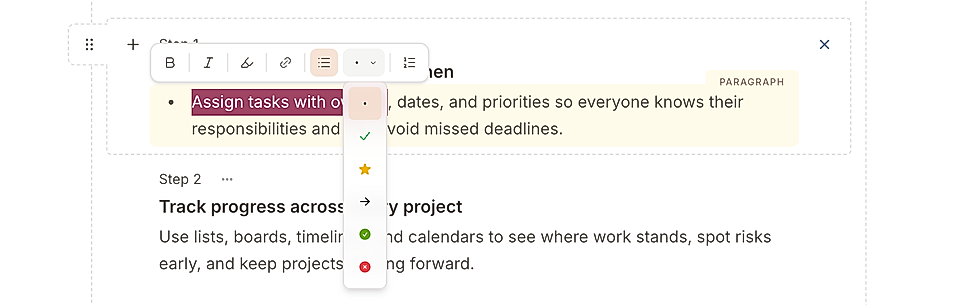
Here’s an example page layout with check marks in a list: 
Use the Steps section for more visibility
Another way to create a list and make it stand out is by using a Steps section.
To add one:
Click add a new section on the left side of the page editor
Choose Steps

Select the type of content you want LandingRabbit to generate or choose 'Something else'
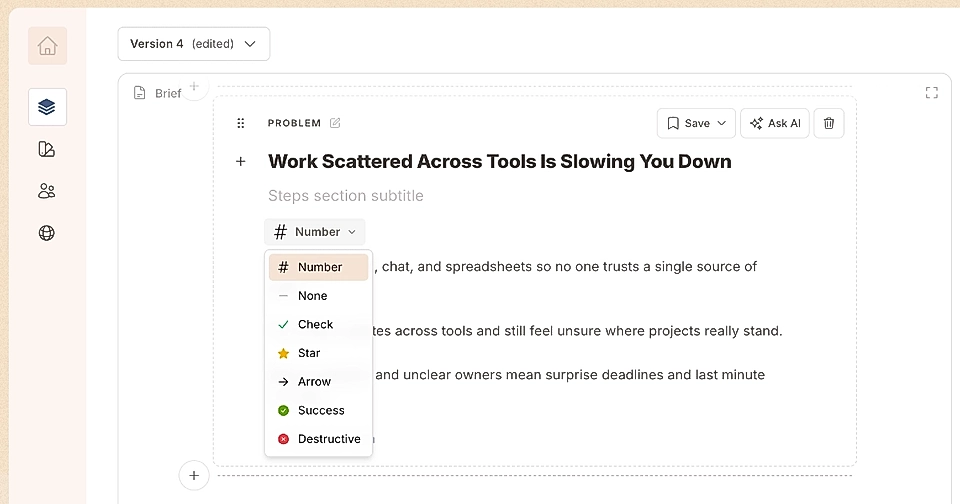
After the content is generated, you can choose which icons to use. By default, the steps section uses numbers like 1, 2, 3, and so on, but you can replace them with custom icons.
In Steps section layout settings, you can also:
Choose from image display options if the image should fill the placeholder or show in full
Switch the image position to the left or right
Hide the image to center the text on the page
